Posts

Showing posts with the label TS-ARM

How to Add Swap on ts-7260 Linux

Image
For any reason, you may need extra memory on your ts-7260 SBC but the build in RAM is only 28MB. In my case, it get rebooted when I'm running few programs that continuously reading the input from the DIO. As this system is running linux, we can use swap memory instead of physical RAM. So, to solve this problem, we can create swap file on this ts-7260. Here is how to add swapfile on ts-7260 board running the default debian Sarge on ts11 kernel 2.4 SD card boot linux.

3 Pin serial connection for Wavecom GSM Modem

Image
When working with SBC or Single Board Computer for embedded project, we can't have full RS-232 serial with all 9 pin signal compatibility at all times. For instance, while I'm working with TS-7260 board from Technologic Systems, the COM3 serial interface have only 3 pin which is RX, TX and GND. So, in order to make my Wavecom GSM/GPRS/EDGE modem working, I have to create my own cable pinout to connect the 15 pin connector on the Wavecom Modem to the 3 pin RS-232 serial interface on the board. Before creating the cable, I did some search and find this cable pinout from Wavecom GSM Modem manual. Pin Description 1 DCD (Data Carrier Detect) 2 TXD (Transmit Data) 3 Reserved 4 MICROPHONE (+) 5 MICROPHONE (-) 6 RXD (Receive Data) 7 DSR (Data Set Ready) 8 DTR (Data Terminal Ready) 9 GND(Signal Ground) 10 SPEAKER (+) 11 CTS (Clear To Send) 12 RTS (Request To Send) 13 RI (Ring Indicator) 14 RESET 15 SPEAKER (-) and the pinout from TS-7260 Board manual: 5.6 C...

Some Photos from my office's Desktop

Image
It is Sunday, and I'm checking my old photos... And then, I found my office's desktop photos. You may want to see them. Sometimes, my desk is clean but sometimes, it get horribly messy... This is the average looks of it. Working on these Wireless Rain Gauge development have build up my skills in linux bash programming and I learn a lot on how Single Board computer works. In the beginning, we just create a daughter board and attach it to a hacked LinkSYS WRT45GS board which I've installed OpenWRT so I can embed my bash script inside. But then, we go for TS-7260 board from embeddedarm.com to get more control on the RainGause for version two. Till now, I'm still upgrading the code for more features and stability. Well, that's all for now. Enjoy what you're doing!!

Debian SSH problem after upgrading Sarge to Etch?

Image
About 3 hour I've been strugling to figure it out... why my ssh keep closing the connection after I issued the correct password? Actually, I just upgrade the Debian on this TS-7260 board from the default Sarge to Etch. I search all the settings in /etc/ssh/sshd_config, nothing much different... i tried to check wether it is hosts.allow or hosts.deny problem but it wasn't... I keep on trying many times... thank god i can still access the board using serial console. I tried to restart the server but still, I can't get in. I've tried to ssh with -vv and this is what I got... apogee@apogee-persiasys:~$ ssh -vv raingauge@10.1.1.92 OpenSSH_4.6p1 Debian-5ubuntu0.1, OpenSSL 0.9.8e 23 Feb 2007 debug1: Reading configuration data /etc/ssh/ssh_config debug1: Applying options for * debug2: ssh_connect: needpriv 0 debug1: Connecting to 10.1.1.92 [10.1.1.92] port 22. debug1: Connection established. debug1: identity file /home/apogee/.ssh/identity type -1 debug1: identity file /ho...

Enabling Serial Console on /dev/ttyAM1 in TS-7260

Image
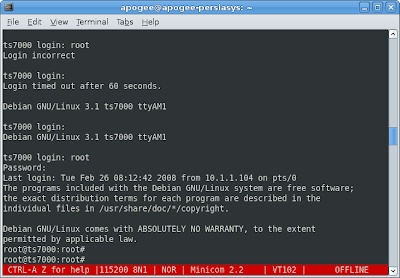
I'm running Debian on SD card for this TS-7260. I decided to switch the serial console to the second port which is /dev/ttyAM1 because I'm going to use the first serial /dev/ttyAM0 for my Wavecom GPRS modem. So, I open the /etc/inittab and just realize that serial console on /dev/ttyAM1 is already there. Then I grab my RS-232 cable and plug it from my /dev/ttyS0 on my PC to the /dev/ttyAM1 on the TS-ARM board... after waiting for some seconds, my minicom shows the login... Debian GNU/Linux 3.1 ts7000 ttyAM1 ts7000 login: So, I type root and press the enter... the console returns, "Login incorrect"... WTF!! How come the serial console on the second port is useless for root? The solution for this is actually very simple. But it took me some minutes to figure it out... hehehe... Thank god, i've already fixed the ssh, so i can ssh to the board... $ ssh root@10.1.1.91 $ Password: The solution is, edit the /etc/securetty file... $ vi /etc/securetty And then add the line...