Posts

Showing posts with the label debian

Debian SSH problem after upgrading Sarge to Etch?
Image
About 3 hour I've been strugling to figure it out... why my ssh keep closing the connection after I issued the correct password? Actually, I just upgrade the Debian on this TS-7260 board from the default Sarge to Etch. I search all the settings in /etc/ssh/sshd_config, nothing much different... i tried to check wether it is hosts.allow or hosts.deny problem but it wasn't... I keep on trying many times... thank god i can still access the board using serial console. I tried to restart the server but still, I can't get in. I've tried to ssh with -vv and this is what I got... apogee@apogee-persiasys:~$ ssh -vv raingauge@10.1.1.92 OpenSSH_4.6p1 Debian-5ubuntu0.1, OpenSSL 0.9.8e 23 Feb 2007 debug1: Reading configuration data /etc/ssh/ssh_config debug1: Applying options for * debug2: ssh_connect: needpriv 0 debug1: Connecting to 10.1.1.92 [10.1.1.92] port 22. debug1: Connection established. debug1: identity file /home/apogee/.ssh/identity type -1 debug1: identity file /ho...
Enabling Serial Console on /dev/ttyAM1 in TS-7260

Image
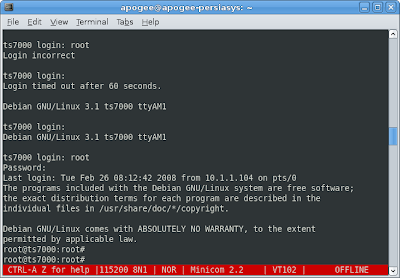
I'm running Debian on SD card for this TS-7260. I decided to switch the serial console to the second port which is /dev/ttyAM1 because I'm going to use the first serial /dev/ttyAM0 for my Wavecom GPRS modem. So, I open the /etc/inittab and just realize that serial console on /dev/ttyAM1 is already there. Then I grab my RS-232 cable and plug it from my /dev/ttyS0 on my PC to the /dev/ttyAM1 on the TS-ARM board... after waiting for some seconds, my minicom shows the login... Debian GNU/Linux 3.1 ts7000 ttyAM1 ts7000 login: So, I type root and press the enter... the console returns, "Login incorrect"... WTF!! How come the serial console on the second port is useless for root? The solution for this is actually very simple. But it took me some minutes to figure it out... hehehe... Thank god, i've already fixed the ssh, so i can ssh to the board... $ ssh root@10.1.1.91 $ Password: The solution is, edit the /etc/securetty file... $ vi /etc/securetty And then add the line...