Posts

Showing posts with the label Windows XP

List Windows XP Running Process And ProcessID in VBScript

Image
One of my reason why I hate Windows XP is because it is prone to virus. However, I can't escape from using it because there are instruments which I use that can only communicate with it's own proprietary windows program. Love it or not, I still need these proprietary programs to run in the windows box on site because they don't have linux version of it nor even going to have it. Leaving the windows box like that. I believe in some way, it will get infected when some user access the box to grab some data with their infected USB drive or there is virus in the network. It simply happened last two weeks on the site box where this virus prevent me to open the Windows Task Manager to show what process is running in the box. Thanks to VBScript which allows me to view the running process and investigate. So, after getting frustated and cursing the virus prone OS for some time, I just open Notepad program and begin writing this script: '==========================================...

Jeff Atwood starts war against Linux?

Image
I regularly visit CodingHorror Blog by Jeff Atwood... I love reading his posts and his readers comments. I feel like I'm in a coder's community who hang around listening and talking about what Jeff said. However, I don't know is it an April fool or it is for real where his posts on Let That Be a Lesson To You, Son: Never Upgrade is shockingly sounds like linux-bashing attempt: "Apparently, Linux is so complex that even a world class software engineer can't always get it to work. I find it highly disturbing that a software engineer of Jamie's caliber would give up on upgrading software. Jamie lives and breathes Linux. It is his platform of choice. If he throws in the towel on Linux upgrades, then what possible hope do us mere mortals have? " —Jeff Atwood:CodingHorror I laugh aloud when Jeff said, "Jamie Lives and breathes Linux." while this Jamie guy said that he installed Ubuntu 10.7.... Where did he get that Ubuntu 10.7? I don't know... E...

How to get Windows XP command prompt output to Notepad

Image
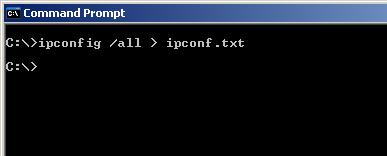
Sometimes we need to copy output from a command prompt and paste it into a Windows program such as Notepad. Usually, you’ll try to use the Mark and Copy commands on the command prompt’s Edit menu. I recently found an article from Tech Republic about Copy and paste from Windows XP Pro’s command prompt straight to the Clipboard where Greg Shultz is introducing a command line tool called Clip.exe. But I have my own way to get information from a command prompt and onto your notepad without using the Clip.exe. It is so simple. Lets say, you want to get the output from ipconfig command, then just add a '>' and type the name of text file you want like 'ipconf.txt'. On the command prompt it will look like this: Then, you can view your output on notepad by simply type 'notepad ipconf.txt' and press enter like this: That's all. Good Luck and have fun! Anyway, you may want to view Greg Shultz's tips on how to Copy and paste from Windows XP Pro’s command promp...

How to Add XP Visual Style to your Visual Basic Application

Image
Recently, I got some friends asking me about how can they add Windows XP visual style on their Visual Basic application. Why can't you get the XP style look when you run or compile your Visual Basic application anyway? For your information, the Windows XP Visual Styles are provided by ComCtl32.dll version 6 or later. The ComCtl32 does not apply the latest styles to the client area of an application by default. So, in order to enable it, you need to ensure that your application is linked to the new ComCtl32.dll by calling the ComCtl's InitCommonControls API call. And then, you also need to provide a Manifest file which specifies that the new version of the control styles should be used. To make this short. All you need to add to your code is this lines of codes on a module... Private Type tagInitCommonControlsEx lSize As Long lICC As Long End Type Private Declare Function InitCommonControlsEx Lib "comctl32.dll" _ (iccex As tagInitCommonControlsEx) As B...

How to Install Perl on Windows XP

Image
Hmm... I'm assigned to a job that requires me to learn and develop things on Pearl now. And for good, I'm also starting this blog. So, it goes to my first topic today. It is how I install Perl on my Windows XP. I'm searching through net to find Perl for windows. Then I find ActivePerl from ActiveState. The Current releases is: ActivePerl 5.8.8.820 and ActivePerl 5.6.1.638 . So, I'm gonna install this on my Windows XP PC. My steps to install Perl on Windows XP : Download ActivePerl from http://www.activestate.com . Goto ActivePerl page . Click on Get Active Perl button then click on Download button. I don't want them to send me adds mails. So, I just skip entering my email details and click Continue button because it's optional. I choose ActivePerl 5.8.8.820 . Click on the MSI link under the Windows (x86). Then my download begin. Got the file!... Then I simply install the MSI by double clicking on it. Follow the instructions... Accepting the Terms and Ne...